

New online and mobile banking features!
Card Management at Your Fingertips
Upgrades enable superior control, security, and financial visibility via your mobile phone and desktop. It lets you manage your cards on the go with an intuitive interface within Liberty First Credit Union Online Banking.
You can perform card management functions such as turning the card on/off, setting merchants or transaction types to be notified on, set alerts for when transactions are run against your card, set your Pin, report your card lost or stolen, and replace a damaged card.
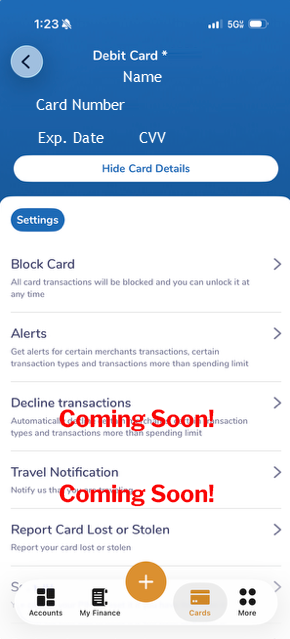
See the entire card information right from your phone or desktop. Log into Online Banking, select “Cards”, click on a specific card within your list of cards, click “View Card”, then “Show Card Details”.
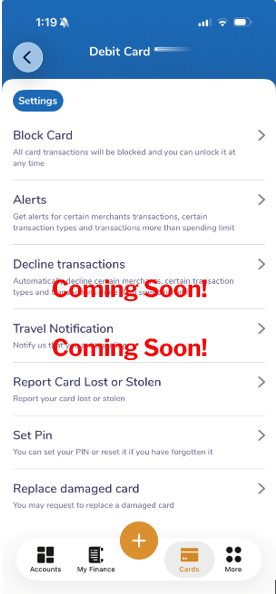
Control your cards by selecting “Cards” within Online Banking and clicking on a specific card you want to control. Use the features above to manage your card right from your phone or desktop.
Review Balances & Transactions
Monitor your finances anytime through Liberty First Credit Union Online Banking.
You can control your cards, set merchant usage controls, set alerts for card transactions, and more.
Fraud Protection
• Real-time alerts keep you informed when your card is used or a transaction is declined.
• When you set your card to “Off,” attempted withdrawals or purchases will be declined.
Want to manage your alerts?
For Debit Cards, click Cards → View Card → Alerts, then enable text or email notifications. Select Type of Alerts to choose which transaction and merchant alerts you receive.
For Credit Cards, click Cards → View Card → Settings → Alerts, then enable text or email notifications. Select Type of Alerts to choose which transaction and merchant alerts you receive.
Control Spending
Set spending limits for general use or specific thresholds by transaction and month.
FAQs
Please contact Liberty First Credit Union directly with any support questions.